
Winkler County Traffic Warrants Explained
A traffic warrant begins with a court citation, not a driver-history report. Kermit code says a failure to comply with a citation, summons, or bail requirement can lead the municipal clerk to seek an arrest warrant. Wink lists missed response dates, failure to appear, nonpayment, and missed court conditions among its triggers.
City citations stay with Kermit or Wink Municipal Court. County or precinct citations belong to JP 1 or JP 2. The first question is which court received the ticket.
Winkler County Traffic Citations to Warrants
Kermit's city code describes a local chain: citation to appear, failure to comply or answer a summons, then possible warrant process through the municipal clerk. Wink's procedures add missed response, nonpayment, deferred-disposition, driving-safety-course, or payment-plan terms as reasons to contact its court.
A missed date and an unpaid judgment are not identical. The first may lead to FTA arrest process; after judgment, unpaid terms may lead to a capias pro fine. Ask the clerk which one applies before choosing a payment or appearance route.
Kermit's citation enforcement code describes the city process.
Checking Winkler County Traffic Warrants
Use the portal for the court printed on your citation. Kermit supports several citation searches; Wink's city page directs users to GovRec by citation number. The JP page links payment but does not label that service a warrant search.
If no result appears, call the clerk. The sheriff has no public warrant portal and DPS cannot check warrants for callers. This is a court-record question.
- Read the citation and identify Kermit, Wink, JP 1, or JP 2 as the court.
- Use Kermit's city portal or Wink's citation-number route only for that city's matter.
- Call the municipal or JP clerk to confirm whether a warrant issued and what it requires.
- Ask whether you need payment, a new setting, an attorney, or voluntary appearance before travel.
- Check DPS/OmniBase separately if a license-renewal hold is reported.
Winkler County Traffic Citation Search in Kermit
Kermit's Tyler portal has a citation-number route with date of birth. It also offers driver-license, Social Security, vehicle, name, and business paths. The name search uses first and last name plus date of birth. The visible interface has sign-in controls, but the basic citation search is available.
Use sensitive fields only for your own matter. The portal handles municipal citations and payment; the city does not describe it as a complete warrant list. The Kermit Municipal Court page links the city search and lists the court phone for case questions.
For broader record routing, see the Winkler County warrant lookup instructions.
Winkler County Traffic Warrant Fields
Local sources do not publish one standard warrant-number format. A portal may show citation, case, payment, or warrant-related status, while a court clerk can check the actual process in its file. Ask for the court and the case reference first.
Do not assume the amount on a citation is the current bond or that paying online recalls a warrant without court action.
| Citation reference | Use the printed citation number; a local warrant-number format was not published. |
|---|---|
| Offense | Traffic or other fine-only Class C allegation. |
| Issuing court | Kermit Municipal, Wink Municipal, JP 1, or JP 2. |
| Payment or bond | Confirm amount, method, and whether a setting is still required. |
| Status | Citation / FTA / warrant may be separate entries. |
Winkler County Traffic Warrants in Kermit and Wink
Kermit links a municipal citation portal and a dated warrant PDF. Wink tells users to search the citation number under criminal search in GovRec, then call the court. The public Wink portal's fields beyond citation number were not verified during research.
| Ticket from | First check | Next question |
|---|---|---|
| Kermit city | Tyler citation portal | Does the court show a current warrant? |
| Wink city | GovRec, citation number | Can the clerk set a judge date? |
| JP 1 or 2 | JP clerk | What payment or FTA process applies? |
Do not pay one court for a citation held by another. Verify the court name on the paper.
How to Resolve a Winkler County Traffic Warrant
Ask the issuing court whether payment alone clears the process or whether a judge setting is required. Kermit lists a drive-through kiosk at 110 S Tornillo, cash or credit payment, and an after-hours payment line. Wink accepts online card payment, money order by mail, or payment at the city office; confirm the court's current instructions.
- Call the court and ask for the current amount, process type, and next date.
- Ask whether payment, a plan, a new setting, or a bond is the correct route.
- Keep the receipt and any order showing the warrant was lifted or recalled.
- Ask when the court will report compliance to DPS or OmniBase.
Warning: A payment receipt may not show that the court recalled a warrant. Ask the clerk to confirm the case status and any required appearance.
Winkler County Traffic Warrant Safe Harbor
Wink Municipal Court has a published safe-harbor process for its own traffic warrants. A person calls to schedule time with the judge and may use the walk-in docket on a regular court date. The city says voluntary appearance to set a hearing will not lead to arrest on a Wink court traffic warrant.
The process does not cover Kermit, JP, or felony warrants. Confirm that the standing notice remains current, then ask whether to bring a citation, payment record, or other paperwork.
Wink's procedures and fines describe the safe harbor and payment options.
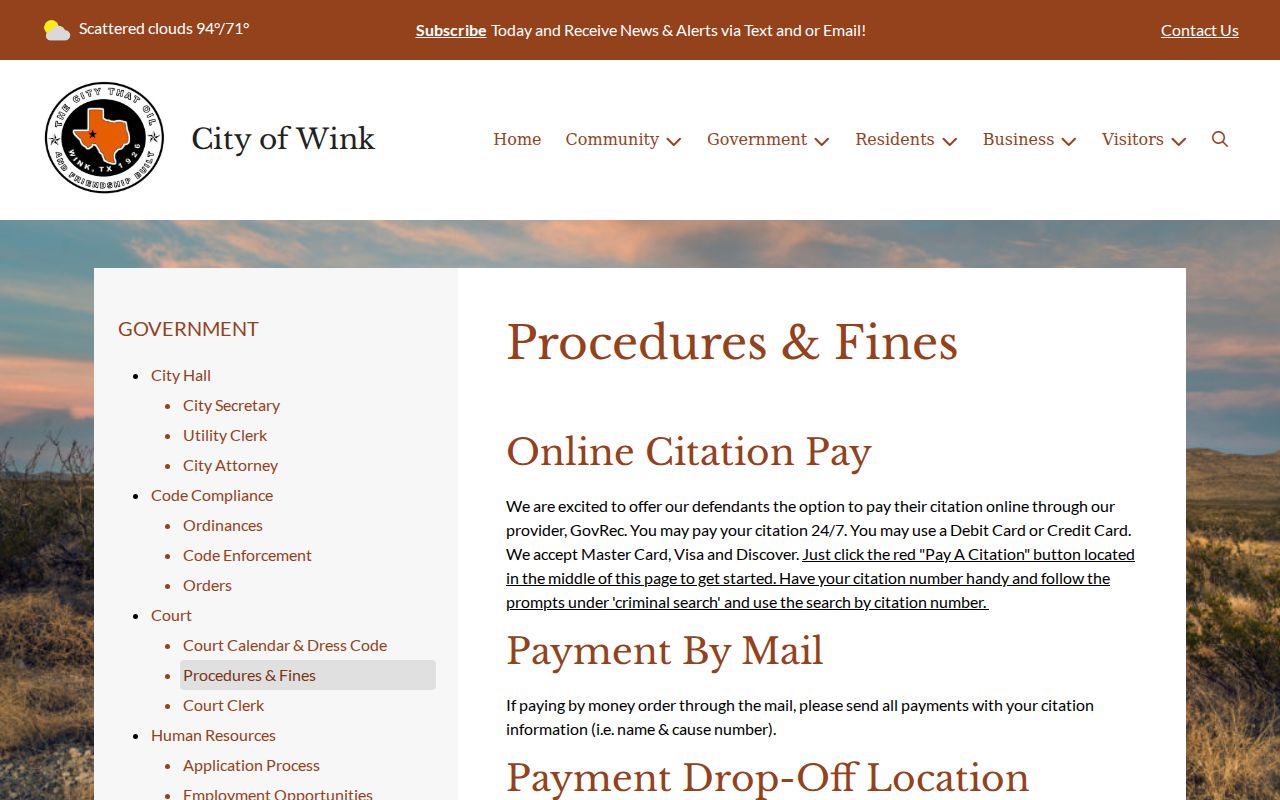
This city policy gives a local appearance route and should not be applied to another court's warrant.
Winkler County Traffic Warrants, FTA, and License Holds
A court warrant authorizes an arrest; an FTA or FTP entry can also affect license renewal through DPS. They are related but separate records. Paying a citation does not make DPS a warrant-confirmation service, and a city warrant may not appear in OmniBase.
| Mechanism | What Triggers It | What It Does |
|---|---|---|
| Court warrant | Missed date or failure to resolve citation | Authorizes custody under the court process |
| FTA or FTP report | Court reports an unpaid or missed obligation | Can block Texas license renewal |
| OmniBase status | Reported citation violation in the DPS program | Not a complete warrant search |
Winkler County Traffic Warrant DPS Hold Updates Take Time
Texas DPS says OmniBase can show reported FTA or FTP violations. Call (800) 686-0570 for that program. DPS says license staff cannot check warrants, and a paid citation may take up to seven business days to clear after the court reports compliance.
If the hold remains after that period, contact the court that reported the case. The court, not the driver-license office, confirms whether a warrant was recalled or whether another setting remains due.
DPS's FTA/FTP FAQ explains the limit and update timing.
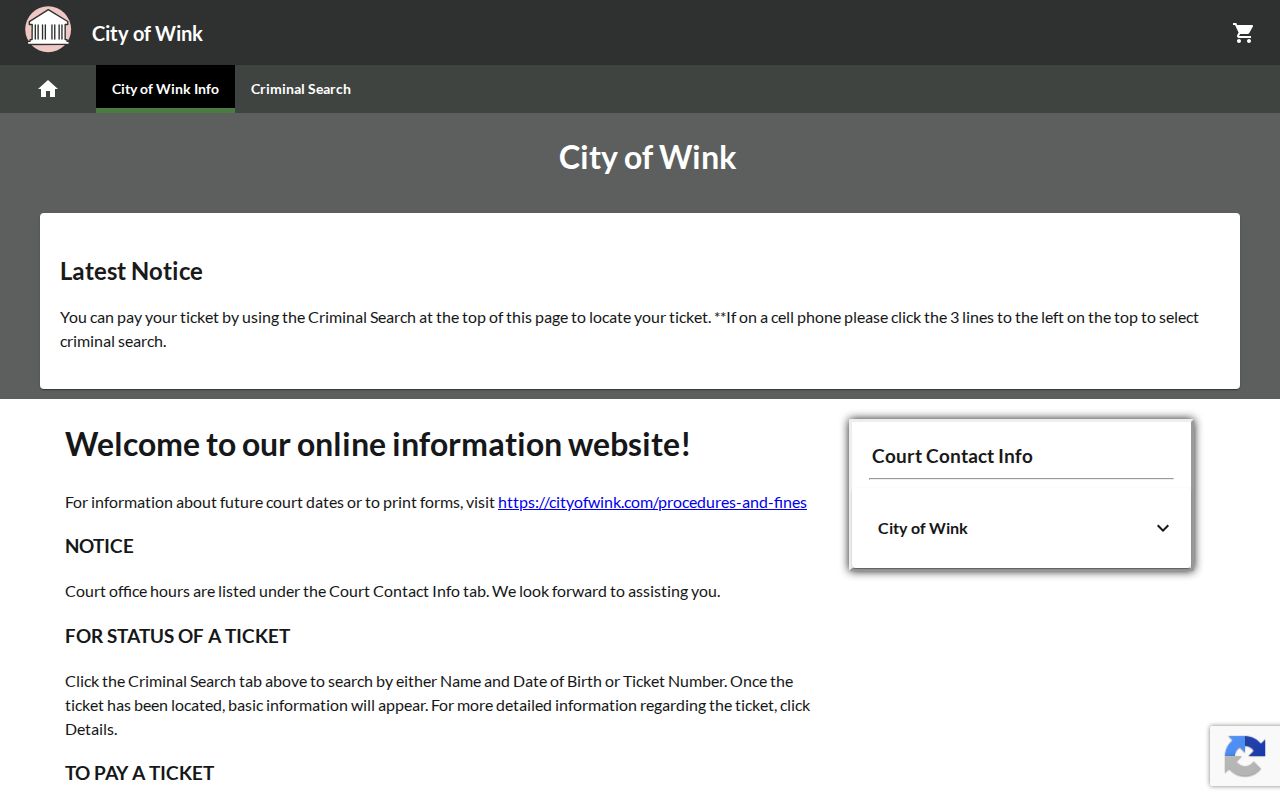
The city-linked payment portal is a citation route; court confirmation remains the source for warrant status.
For municipal court details, use Winkler County Municipal Warrant information.